How to Play Piano on Your Computer Keyboard (61-Key QWERTY Map)
RoxyPiano lets you play 5 full octaves (61 keys, C2 to C7) directly on any PC or laptop QWERTY keyboard while keeping the full 88-key acoustic grand piano intact. Enable PC Keyboard Mode to display on-key letter labels, lock all conflicting shortcuts, and use the Spacebar as a responsive sustain pedal.
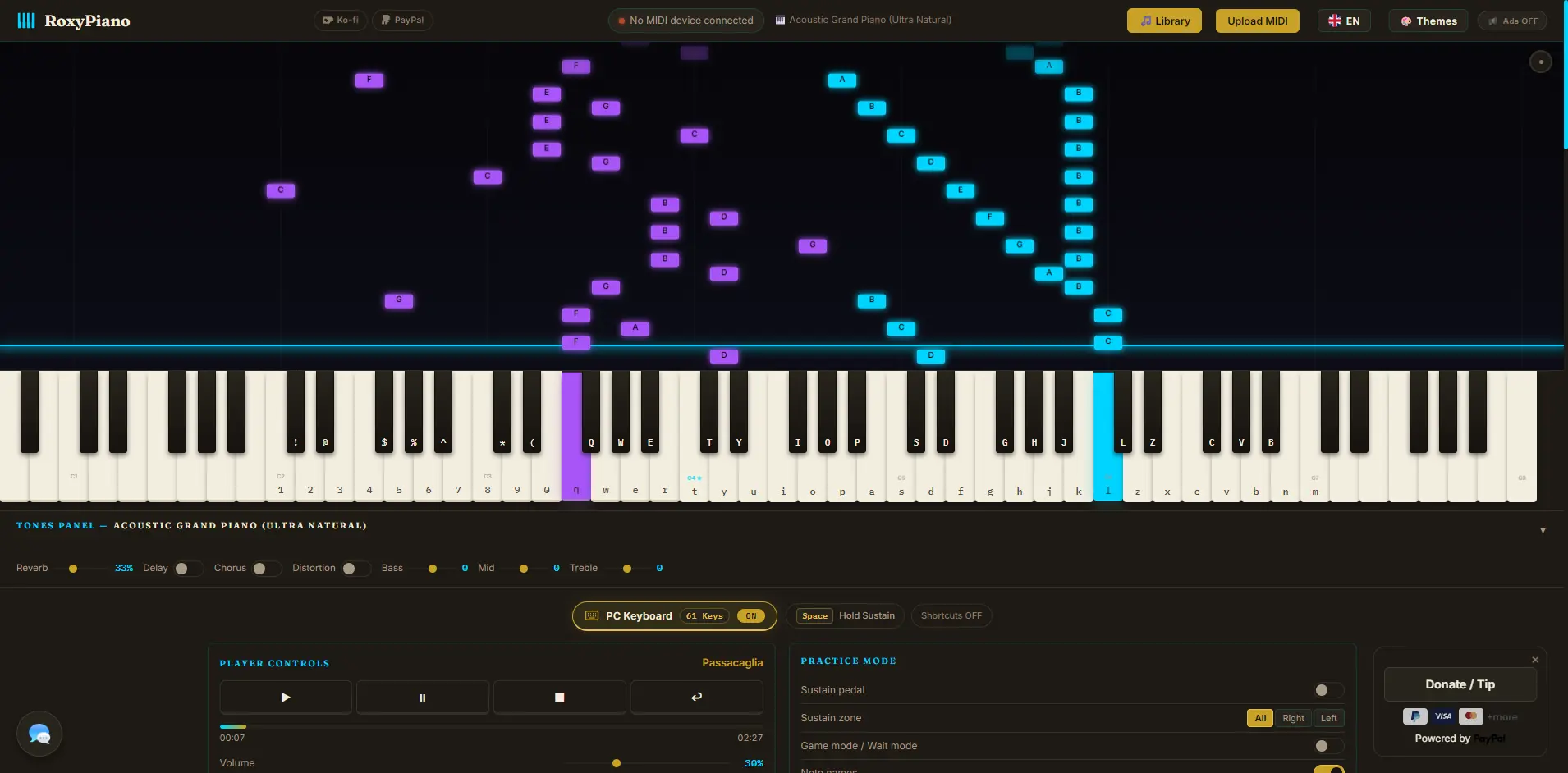
Complete 61-Key QWERTY Piano Chart (C2–C7)
White keys use the 36 alphanumeric keys from 1 through m (Middle C4 starts at t). Hold Shift with any key that has a sharp above it to play the 25 black keys (! through B). CapsLock never interferes because RoxyPiano tracks physical key codes.
| Octave | White Keys (No Shift) | Black Keys (Hold Shift) |
|---|---|---|
| C2 – B2 | 1C22D23E24F25G26A27B2 |
!C#2@D#2$F#2%G#2^A#2 |
| C3 – B3 | 8C39D30E3qF3wG3eA3rB3 |
*C#3(D#3QF#3WG#3EA#3 |
| C4 – B4 ★ | tC4yD4uE4iF4oG4pA4aB4 |
TC#4YD#4IF#4OG#4PA#4 |
| C5 – B5 | sC5dD5fE5gF5hG5jA5kB5 |
SC#5DD#5GF#5HG#5JA#5 |
| C6 – C7 | lC6zD6xE6cF6vG6bA6nB6mC7 |
LC#6ZD#6CF#6VG#6BA#6 |
8 Popular Piano Chords You Can Play on a Laptop
Try these common pop and classical chords right inside RoxyPiano with PC Keyboard Mode enabled. Hold the Spacebar while switching between chords for smooth legato sustain.
C Major
C4 – E4 – G4
G Major
G4 – B4 – D5
A Minor
A4 – C5 – E5
F Major
F4 – A4 – C5
D Minor
D4 – F4 – A4
E Minor
E4 – G4 – B4
D Major
D4 – F#4 – A4
E Major
E4 – G#4 – B4
How to Start Playing with Your PC Keyboard in 4 Steps
-
Open RoxyPiano in any modern browser
Launch RoxyPiano at roxypiano.web.id and click Get Started to initialize the 16-velocity-layer Salamander Grand Piano V3 sound engine.
-
Turn ON PC Keyboard (61 Keys)
Click the centered PC Keyboard · 61 Keys toggle pill directly above the Player Controls and Practice Mode panels. All 61 character labels (1–m and !–B) appear instantly on the piano keys.
-
Use Spacebar as your Sustain Pedal
While PC Keyboard Mode is active, 100% of playback shortcuts are disabled so you never accidentally trigger Wait Mode or Metronome. Hold Spacebar to sustain notes and release it to dampen.
-
Combine with Split Sustain & MIDI Output
You can even route your laptop typing into external synthesizers via MIDI Output or restrict Spacebar sustain to the Right or Left hand using Split Sustain (default Split Point C4).
Pro Tips: Anti-Stuck Notes, Rollover & CapsLock Safety
Shift Release Order Safe: Even if you release Shift before releasing a black-key letter (e.g., Shift+T for C#4), RoxyPiano tracks the exact physical key code and releases the right note with zero stuck notes.
Keyboard Ghosting / Rollover: Some budget laptop keyboards only register 3–4 simultaneous keys in certain clusters. If a 4-note chord drops a key, hold Spacebar Sustain and roll (arpeggiate) the chord smoothly.
Use with Falling Notes & Wait Mode: Load any song from the built-in MIDI Library, enable Wait Mode, and practice sheet patterns straight on your laptop keyboard.
Frequently Asked Questions
Which key is Middle C (C4) on RoxyPiano PC Keyboard Mode?
Middle C (C4, MIDI 60) is mapped to the lowercase letter "t", following the standard 61-key VirtualPiano QWERTY convention from C2 ("1") to C7 ("m").
How do I play black keys (sharps and flats) on a computer keyboard?
Hold Shift while pressing the white key directly below the black key—for example, Shift+t plays C#4, Shift+y plays D#4, and Shift+i plays F#4. Shift+E or Shift+B keys are safely ignored so you never trigger accidental white notes.
Why did my R, W, S, M, or Space shortcuts stop working?
When PC Keyboard Mode is turned ON, 100% of keyboard shortcuts are intentionally locked so every letter plays music and Space acts as your Sustain Pedal. Click the PC Keyboard button again to turn it OFF and restore all shortcuts immediately.
Does CapsLock break black keys on RoxyPiano?
No. RoxyPiano uses physical KeyboardEvent.code plus the real Shift modifier rather than character casing, so leaving CapsLock on will never accidentally play black keys.