Free Online Synthesia Alternative with Full MIDI Output in Your Browser
Looking for a free browser-based alternative to Synthesia that does not stop at MIDI Input? RoxyPiano v2.5 delivers 60fps falling notes, Wait Mode, 88 keys, 128 GM sounds, Split Sustain, and full Web MIDI Output (Channels 1–16, MIDI Thru, browser audio mute, and live CC91 Reverb sync) with zero download or paywall.
RoxyPiano vs Synthesia vs OnlinePianist (2026 Comparison)
Here is a transparent side-by-side breakdown of how RoxyPiano compares with popular falling-notes piano tools for both beginners and hardware MIDI keyboard owners.
| Feature | RoxyPiano v2.5 | Synthesia | OnlinePianist |
|---|---|---|---|
| Price | $0 (100% Free) | Paid license (~$39+) | Subscription |
| Runs in Browser (No Install) | ✅ Yes (PWA) | ❌ Desktop/App only | ✅ Yes |
| MIDI Keyboard Input (USB/BT) | ✅ Free | ✅ Paid | ✅ Paid tier |
| MIDI Output to Digital Piano / DAW | ✅ Free (Ch 1–16 + CC91) | ✅ Paid | ❌ No |
| Anti-Echo MIDI Thru Toggle | ✅ Yes | ✅ Yes | ❌ No |
| Falling Notes & Wait Mode | ✅ Free | ✅ Paid | ✅ Limited free |
| Split Sustain Pedal (All / R / L) | ✅ Free (Adjustable Split) | ❌ No | ❌ No |
| 61-Key PC Keyboard Mode | ✅ Free (+ Space Sustain) | ❌ No | ❌ No |
| Built-in Acoustic Grand Audio | ✅ Salamander V3 (16 layers) | Basic GM synth | Synthesized |
| Custom .mid File Upload | ✅ Unlimited & Free | ✅ Paid | ❌ No |
How to Connect MIDI Input & MIDI Output to Your Digital Piano or DAW
-
Connect via USB-MIDI, USB-B, or Bluetooth MIDI
Plug your Yamaha, Roland, Casio, Korg, Kawai, or AKAI keyboard into your computer using a USB cable or pair via Bluetooth MIDI. Use Chrome, Edge, or Opera for full Web MIDI API support.
-
Allow Browser MIDI Access & Verify Detection
Open RoxyPiano and allow MIDI access when prompted. Your keyboard name appears immediately in the top header with a live status indicator.
-
Select Your MIDI Output Port & Channel (1–16)
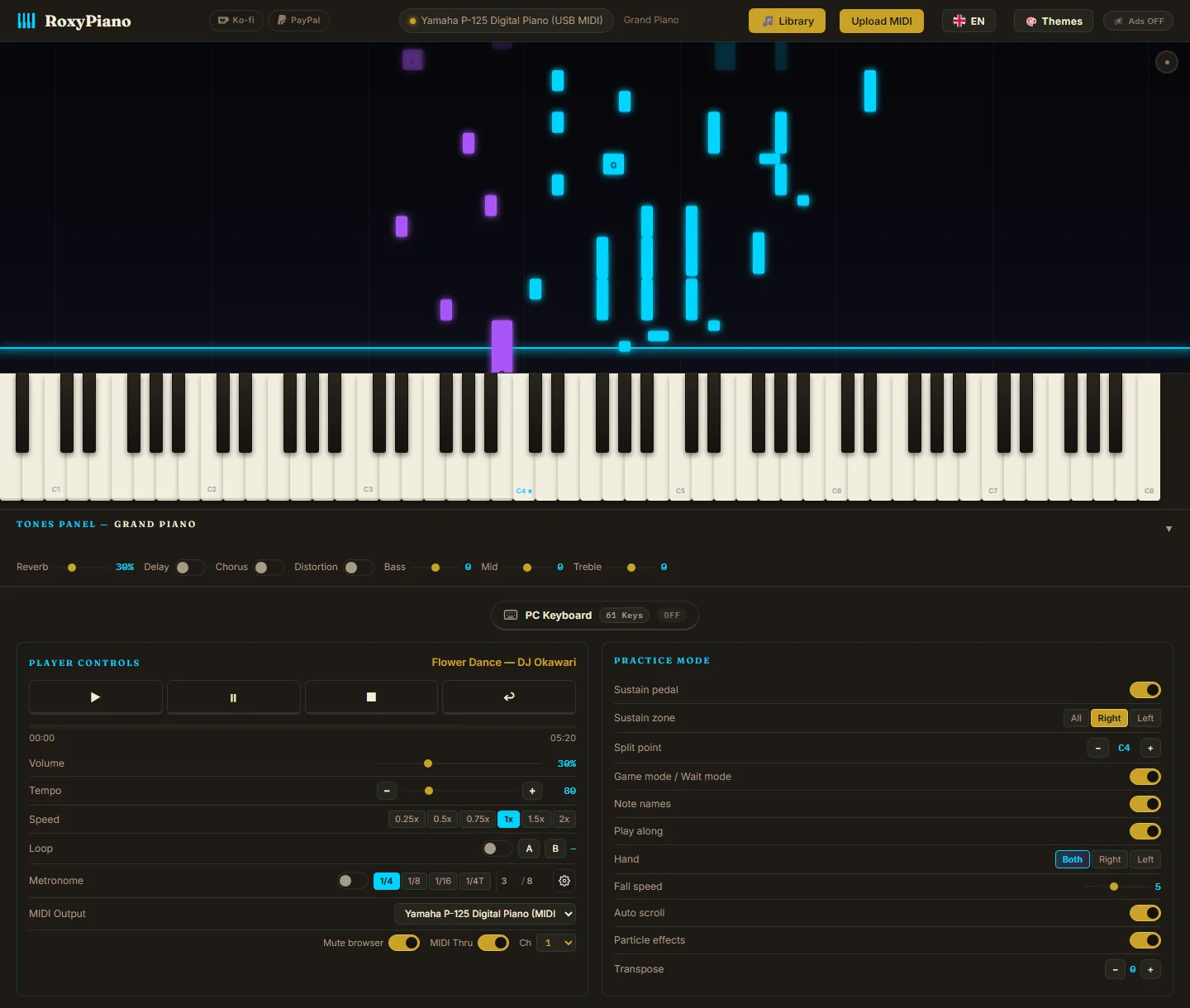
In the Player Controls panel, open the MIDI Output dropdown and select your digital piano, hardware synthesizer, or virtual MIDI port (loopMIDI on Windows / IAC Driver on macOS). Pick the matching MIDI Channel (default Ch 1).
-
Choose Browser Mute & Anti-Echo MIDI Thru
Keep Mute Browser ON if you want sound only from your physical keyboard speakers. Leave MIDI Thru OFF for normal playing (prevents double-note echo when your keyboard has Local Control ON). Turn MIDI Thru ON only when routing through an external synth or with Local Control OFF.
-
Play Falling Notes or Live Reverb Sync (CC91)
Load any .mid file and press Play—falling notes play straight out of your keyboard speakers or DAW! Adjusting the Reverb slider also transmits live MIDI CC91 messages to compatible hardware.
Hardware & DAW Setup Notes (Local Control & Virtual Ports)
Preventing Double Notes (Local Control): Digital pianos (Yamaha P-series, Roland FP-series, Casio Privia) play their own internal sound when you press keys. Keep MIDI Thru OFF so RoxyPiano only sends falling-note playback to your piano. If you want RoxyPiano to process your live keys via MIDI Thru, disable Local Control in your piano settings.
Routing to Ableton, FL Studio, Logic, or Cubase: On Windows, install free loopMIDI to create a virtual MIDI cable; on macOS, enable the built-in IAC Driver in Audio MIDI Setup. Select that port in RoxyPiano MIDI Output and arm your VST piano track in your DAW.
Automatic Stuck-Note Protection: Pausing, stopping, seeking, switching ports, or closing the browser tab automatically sends MIDI All Notes Off (CC123) and Sustain Off (CC64) so your external gear never hangs.
Frequently Asked Questions
Which browsers support Web MIDI Input and MIDI Output?
Google Chrome, Microsoft Edge, Brave, Opera, and Firefox (desktop) support the Web MIDI API on Windows, macOS, Linux, and ChromeOS. For the most reliable hot-plug MIDI Output detection, Chrome or Edge is recommended.
Why does RoxyPiano mute browser audio by default when MIDI Output is selected?
Muting browser audio prevents hearing two overlapping piano engines at once (browser sound plus your digital piano speakers). You can uncheck Mute Browser anytime if you want to layer RoxyPiano tones with your hardware.
What is the difference between MIDI Output and MIDI Thru?
MIDI Output sends RoxyPiano falling-note playback and on-screen/PC-keyboard clicks to your external gear. MIDI Thru additionally forwards notes played on your physical MIDI keyboard back out to the selected MIDI Output port (useful when driving a separate hardware synth or DAW).
Is RoxyPiano really free for unlimited custom MIDI files?
Yes. You can upload unlimited .mid files, adjust tempo by ±1 BPM, loop A–B passages, separate left/right hands, and use Wait Mode and MIDI Output completely free with zero subscription.